
Mesh Deck Pager
Long-range LoRa messaging with GPS, a buzzer, and vibration, plus a full QWERTY keyboard.
Mesh Deck Pager is a Mesh Series build with a full QWERTY keyboard. It pairs a long-range LoRa radio, GPS, a microSD card slot, a buzzer, and a vibration motor with a color touchscreen, so you can send messages and share your location with no cell network, no Wi-Fi, and no internet.
This build uses LoRa Pager, which has higher LoRa transmit power than Lora Junior and adds a microSD card slot, a buzzer, and a vibration motor. Its swivel base lets you set the antenna horizontal or vertical.
Looking for the build spec?
The exact modules, Frames, cables, assembly, dimensions, and operating conditions are on the Mesh Deck Pager datasheet.
What you can do with it
- Send text messages across the mesh, fully off-grid
- Share your GPS position across the mesh
- Relay for others, because every device extends the network's reach
- Type on the built-in QWERTY keyboard
What's in it
- Core: ESP32 1.0: the host, with a 2.0-inch color touchscreen, Wi-Fi, and Bluetooth
- Expand: LoRa Pager 1.0: long-range radio and GPS, plus a microSD card slot, a buzzer, and a vibration motor
- Control: Keyboard (Bottom) 1.0: a full QWERTY keyboard for typing
- Power: Standard Cell 1.0 or 1.1: the rechargeable battery
- Frames that hold the modules together, and cables that connect the keyboard and the battery module to the Core module
What it's for
Mesh Deck Pager is for places where your phone has no signal, such as a group hike, a campsite, a crowded festival, or a power outage. You type and read messages on the device itself, and the full keyboard makes longer messages easy to write.
Mesh Deck Pager works right out of the box, with no phone needed. Mesh devices pass messages along for each other, so your message can still reach a friend who's too far away, as long as another device is somewhere in between. Built-in GPS lets you share where you are with your group. To try other firmware, see Firmware.
Power it on
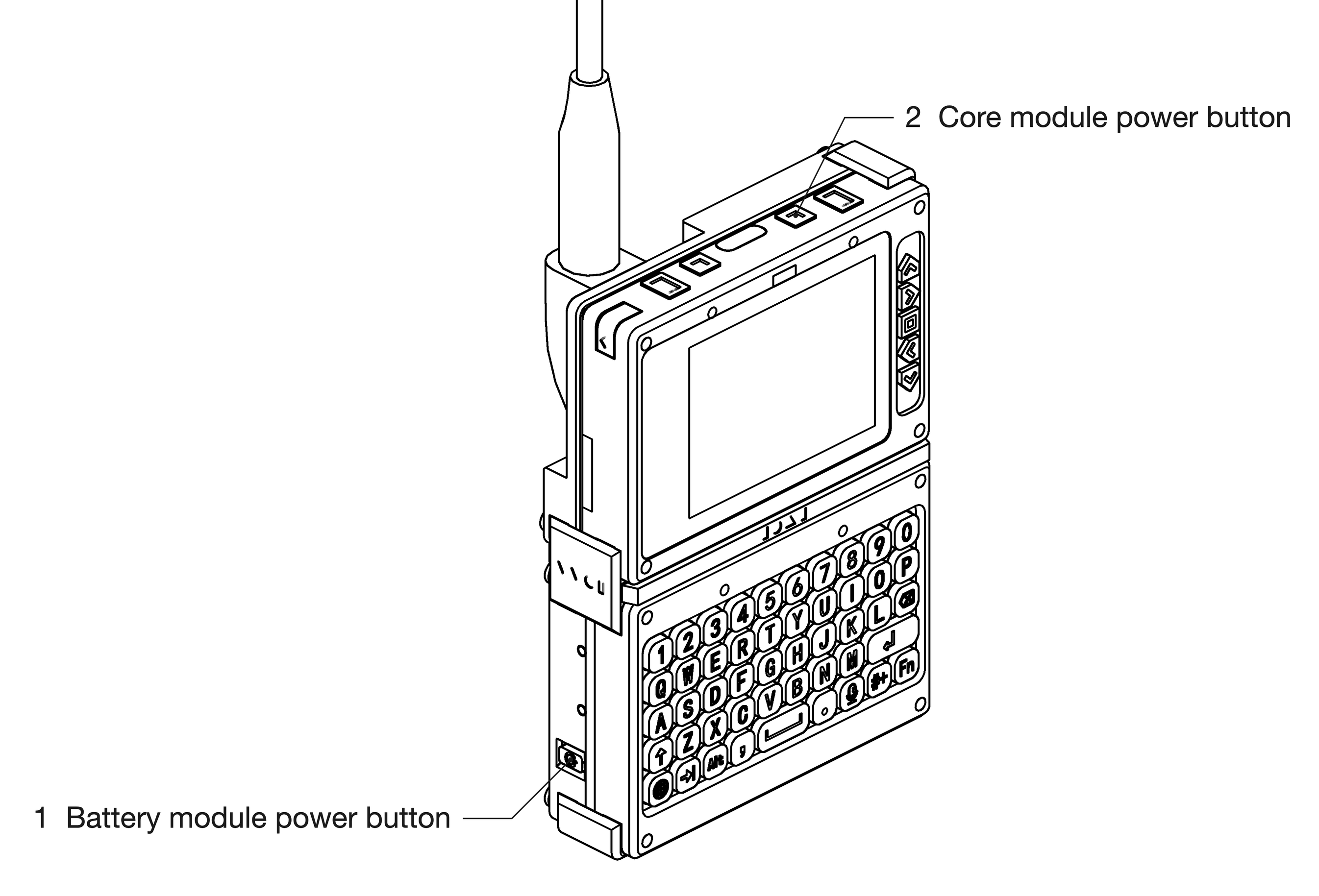
An Attaky has two power buttons, one on the battery module and one on the Core module. Switch the battery module on first, then the Core module.
To turn off your Complete Build, long-press the Core module power button, then the battery module power button.
Set it up
In some areas, the region setting may not configure the right frequency in the firmware. Please check with your local mesh group about the right frequency.
Flash firmware
To install or update firmware, follow the steps in Flash Your First Firmware. Only install firmware made for your build.
Flashing videos. Watch how to flash Meshtastic and WadaMesh.
Quick reference
Built as a Deck. Mesh Deck Pager is built in two sections. The upper section is the Core module with LoRa Pager on its back. The lower section is the keyboard with the Power (battery) module behind it. The battery module connects to the Core module by a 7-pin power cable, and the keyboard connects to the Core module by a 12-pin FPC cable. Frames at the four corners of each module hold the whole assembly together. The datasheet has the full breakdown.
Attach the antenna before transmitting. Like any radio, don't transmit without the antenna attached. The swivel base lets you set the antenna horizontal or vertical, whichever position works best for you.
Region & frequency. The antenna is 915 MHz (North America) or 868 MHz (EU / India). Set your device frequency and use an antenna that matches the frequency allowed by your local regulations.
Keep it dry and cool. It isn't waterproof, so keep it away from rain, splashes, and damp. Operating temperature is 0–40 °C (32–104 °F). Keep it out of direct sunlight and prolonged heat, and do not leave it in a parked car.
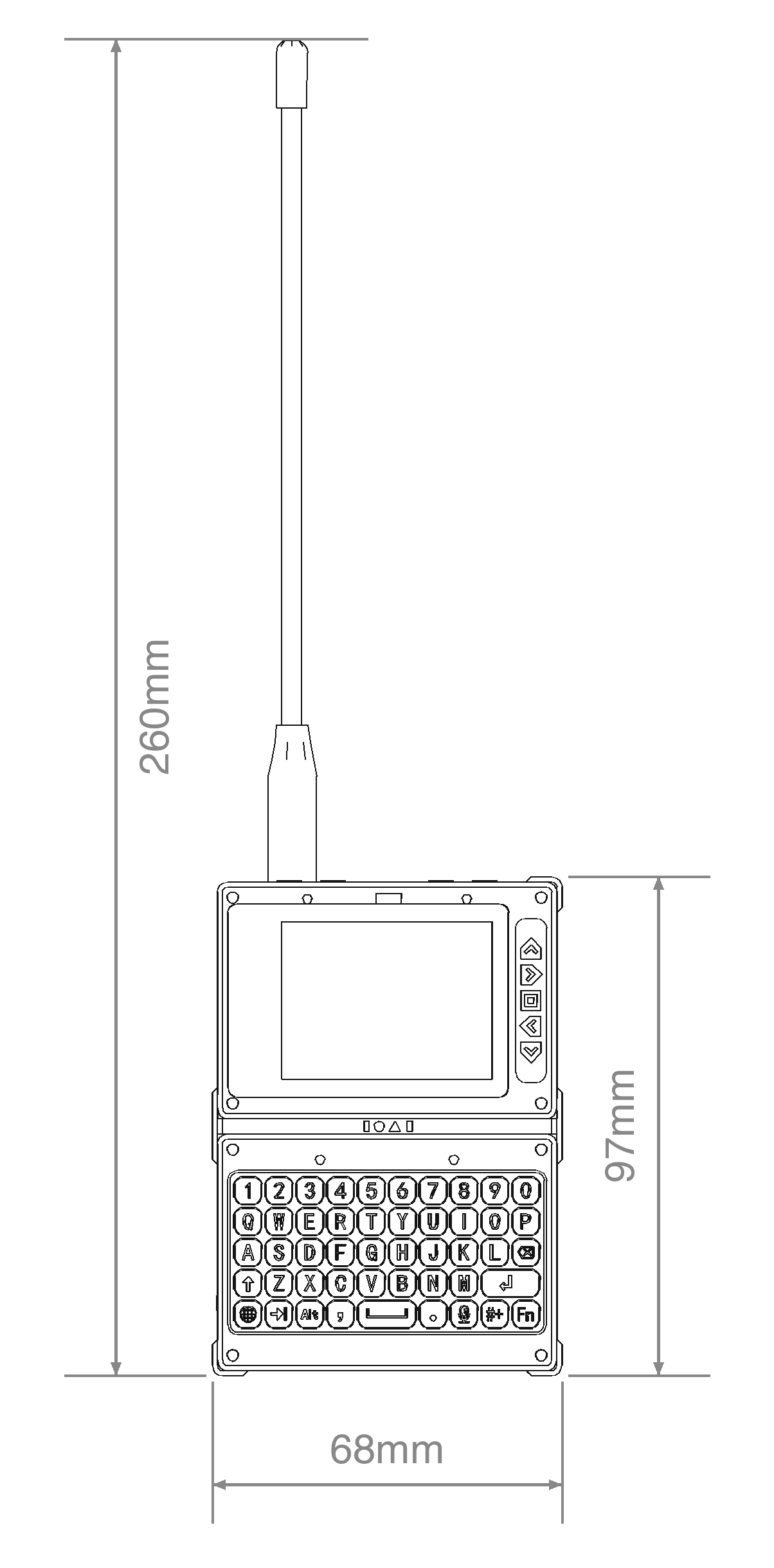
Size. 68 × 97 × 30 mm (260 mm with the antenna up).
Get one
Explore the Mesh Series for all its builds, or Series for every Attaky build.
Check the battery revision
This build comes with either Standard Cell 1.0 or 1.1. The two versions power on and charge differently. See Powering on and charging for how they compare.